


Multiple template-based plugins are progressively being released by TinyMCE, with 2023 being dubbed the “Year of the Template”. So why are they so crucial, right now? Templates offer more – in terms of time saved, productivity increases, consistency and they’re also just a better way to build content. Let’s explore how they can give you more.
Whether it’s designing and sending emails, creating contracts, writing reports, or building documentation, your first CTOs first task is to replace your outdated tools with newer, more agile ones that are specific to your needs and niche. The majority of companies pursuing digital transformation initiatives are looking for ways to get more digital value from their technology – pushing them away from using those old, generic productivity tools and legacy systems, towards something that's more efficient and effective.
And it’s not just old tools and technology that's not working. Manually copying and pasting data between different services is the biggest frustration noticed by thousands of SaaS developers and founders. Constantly stringing together multiple different tools and vendors, results in a fragile workflow with a lot of repetitive copy-paste. A better alternative is tools that make your work simpler.
The new improvements planned for TinyMCE during 2023, undoubtedly make it easier to build a more immersive and satisfying (with the results) content creation experience. That’s why, for TinyMCE, 2023 is the Year of the Template.
Using TinyMCE templates plugins, you’ll be able to more quickly build text editing into your apps, services, tools, and content. The results from that are engaging emails, beautiful reports, clearly structured contracts and other types of screen-first documents– all aided and achieved through improvements and new features from TinyMCE.
Let's dive deeper into what’s ahead with templates.
A niche-tailored SaaS explosion
Companies around the world are outgrowing generic productivity tools and legacy systems. They’re looking to replace them with optimized tools highly tailored to solve industry-specific problems:
- Google Docs takes care of content creation
- Mailchimp manages email production
- Wix can build useful front end solutions
However, they're also solutions for the mass market, and are often more generic than specific.
For example, most lawyers, realtors, medical researchers, analysts, or sales execs have certainly used these products. But they've also likely felt limited. The answer is to use niche-tailored SaaS solutions..
Templates in TinyMCE
What supports SaaS, what makes a niche-tailored solution, is a set of content creation options that speed up development time. Because of the speed they offer, templates grew to become the overarching theme for the TinyMCE roadmap this year. Let’s look a bit more in detail on what features are planned for the year of the template:
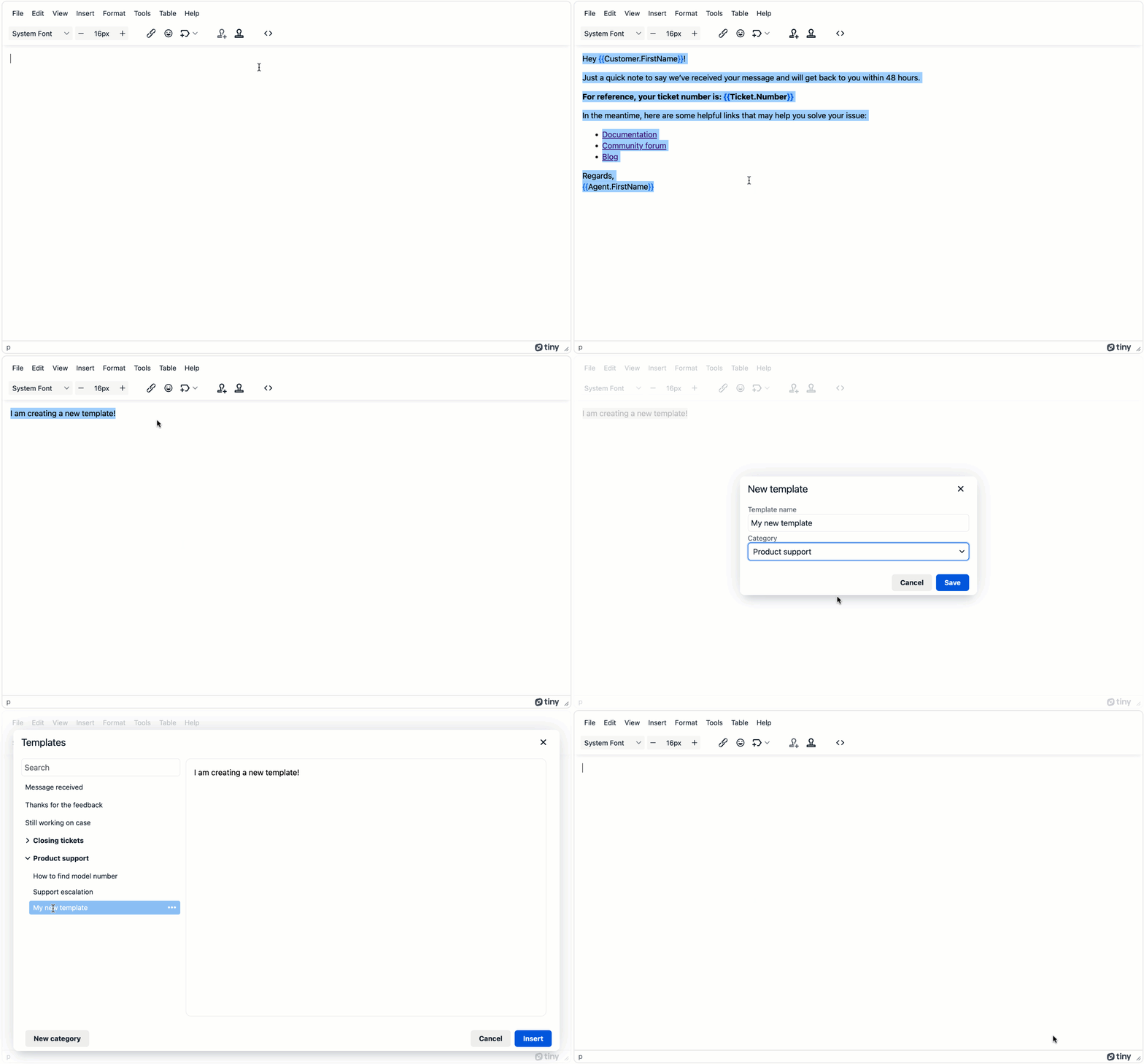
1. Reusable content snippets – April 2023
The new Advanced Template plugin released with TinyMCE 6.4 is a game changer for any use-case where customers repeatedly insert the same content over and over. Examples are:
- Boilerplate answers to support cases
- Email newsletter templates
- Agenda items
- Teachers writing comments on students' essays.
The new plugin can easily manage hundreds of content snippets, and you can organize them into categories so they’re searchable. In addition, it contains everything needed to empower writers to create their own templates from the content they’re creating, in the editor.
They can easily create their own content snippets and update them with minimal administrative set up – helping to save time and resources.
2. Templated content – scheduled for July 2023
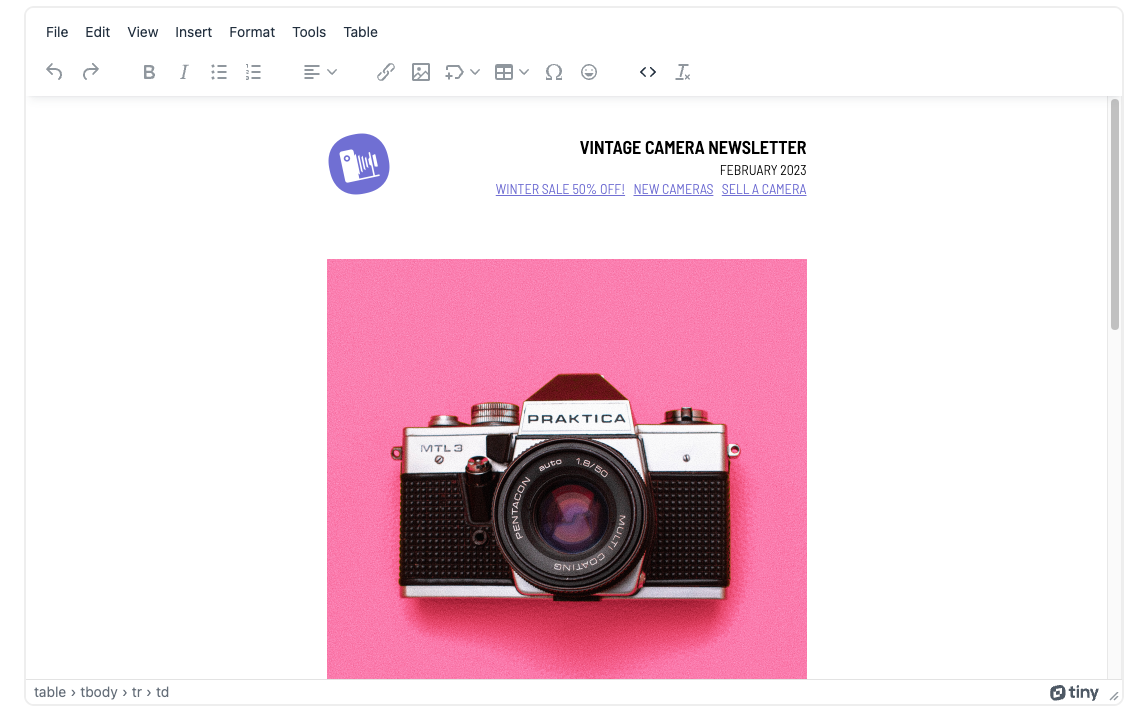
We’re currently working on a new way to create templates within your application, using a new capability called Multi-Root Editing. This enables you to create visually stunning HTML documents, emails and other types of content. For example, using editable and noneditable areas right inside the TinyMCE editor.
For example you can create, within the one editor, an entire email with a static, non-editable header and footer, but an editable body.
Another example is corporate stationery. Here, the logos, contact details, and mission statements appear in alternate fonts – and these parts are non-editable – but the email content itself can be rewritten and changed as needed.
This new capability is also useful in more complex collaborative content workflows.
Picture an editing workflow from end-to-end. Writers write, then it’s handed over to editors. Because you’re only making parts of the content editable, you can lock down other parts of the document (the bits that are pre-approved by an editor or stakeholder), and leave the remaining parts open for review.
What does Multi-Root Editing give you?
Creating templated content, using TinyMCE’s new Multi-Root Editing capabilities, makes the creation process more visual in the UI (the end results are more stunning), it’s a more satisfying UX and it saves developers significant time – which speeds up their developer velocity and outputs.
3. Components and layouts – scheduled for later in 2023
Templates are mainly text. So the problem with our corporate stationery example above, is that it usually combines a logo, quote, and text. Because TinyMCE is HTML underneath the editor, a developer can create all kinds of components and layouts.
You could build a two column layout. Or make something for documentation, with code snippets that can only be updated by certain roles granted editing permission (e.g. SME, Technical Writer, etc).
The possibilities are almost endless, because… all the improvements built into the various page template plugins, come together to make up a reusable, structural component.
In time, drag and drop reordering of your structural components will be launched, making TinyMCE the perfect tool for quickly building HTML email and web pages.
4. Bonus: AI prompt templates – scheduled for later in 2023
Emerging generative AI capabilities are a new way to support and serve content creation. And TinyMCE is on it. While it’s still being explored exactly what this looks like (and how to make it easy to set up), one key area is making the use of generative AI easy and productive.
Writing effective prompts is a huge part of this process.
Jakob Nielson of the Nielson Norman group recently estimated that less than 20% of people in developed countries are capable of writing prompts that would properly leverage advanced generative AI platforms. This means companies looking to bring generative AI into their apps run the risk of either alienating most users when introducing AI capabilities without any guidance on prompts, or producing poor outputs from the generative AI, due to ill defined prompts.
Research has shown pre-written, templated prompts return more useful responses from generative AI. Currently, this is the area being explored by TinyMCE.
Its goal is to not only help you “get AI into your app”, but also help you “make AI useful for users, within your app” – by providing predefined, templated prompts. Stay tuned for more news on this front!
Who benefits from using TinyMCE Templating plugins?
These new features enable greater creative freedom for many different use-cases, while also putting guardrails around certain content areas. Listed below are nine areas to get you started, where you can build text editing into your apps, services, and tools.
It’s worth noting that these ideas can be customized and applied to be industry-specific. For example, if you work in real estate, the way you’d apply a template to a customer email would be different to how a hospital would draft a patient follow-up email. So use these ideas as springboards for your own creativity.
1. Marketing uses for templated content
- Inserting approved brand content:
Have quotes, testimonials, key phrases and other content snippets right at your fingertips.
- Multi-platform publishing:
See how content looks across various channels and create a consistent look and feel.
- Email communication:
Build content templates for celebrating new releases, memos, HR information etc.
2. Sales uses for templated content
- Proposals:
Generate professional sales proposals with pre-defined sections and tailored content for each client.
- Presentations:
Design visually appealing sales presentations with consistent branding and content sections.
- Collateral:
Create customized sales collateral materials, such as brochures, flyers, and catalogs, to effectively showcase offerings to prospective clients.
3. Human Resources for templated content
- Job Offer Letters:
Streamline job offer letters with standard sections and employment details.
- Performance Review Forms:
Simplify performance evaluation with standardized forms for consistent feedback and ratings.
- Intake Forms:
Create and reuse forms for new clients, making modifications as needed with policy changes.
4. Finance and Accounting uses for templated content
- Account Statements:
Generate accurate and standardized account statements for customers, including transaction details and balances.
- Financial Reports:
Create consistent financial reports, such as balance sheets and income statements, with predefined sections and formatting.
- Expense Reports:
Streamline the process of submitting and tracking expenses with templates for expense reports, ensuring consistency and efficiency.
5. Operations and Production uses for templated content
- Standard Operating Procedures (SOPs):
Create standardized templates for documenting and communicating step-by-step procedures to ensure consistency and efficiency in operations.
- Work Instructions:
Streamline assembly line processes with templates for work instructions, providing clear guidance and ensuring consistent quality.
- Incident Reports:
Generate consistent incident reports with predefined sections to effectively document and analyze operational incidents.
6. Customer Service uses for templated content
- Troubleshooting Guides:
Create standardized troubleshooting guides with step-by-step instructions to assist users in resolving common IT issues.
- Knowledge Base Articles:
Design consistent and informative knowledge base articles with templates for easy access to IT-related information and solutions.
- Help Desk Ticketing:
Improve response efficiency by using boilerplate response templates for common help desk inquiries, ensuring consistent and prompt support.
7. Research and Development (R&D) uses for templated content
- Experimental Protocols:
Create standardized templates for documenting experimental protocols, ensuring consistency and reproducibility in research experiments.
- Research Reports:
Generate consistent and structured research reports with predefined sections for data analysis, methodology, and conclusions.
- Patent Applications:
Streamline the process of filing patent applications with templates that include the necessary sections and formatting requirements.
8. Legal and Compliance uses for templated content
- Legal Contracts:
Generate standardized contract templates with pre-defined clauses and legal language to ensure accuracy and compliance.
- Compliance Policies and Procedures:
Create templates for compliance policies and procedures to maintain consistency and adherence to regulatory requirements.
- Legal Correspondence:
- Streamline the creation of legal correspondence, such as cease and desist letters or settlement agreements, with pre-defined templates for efficient communication.
9. Strategic Planning uses for templated content
- Strategic Plans:
Create templates for strategic plans, including sections for goals, objectives, action plans, and timelines, to ensure consistency and alignment across the organization.
- SWOT Analysis Templates:
Design templates for conducting SWOT (Strengths, Weaknesses, Opportunities, Threats) analyses, enabling strategic planning teams to assess internal and external factors in a standardized format.
- Performance Dashboards:
Create templates for performance dashboards, allowing strategic planning teams to track key performance indicators (KPIs) and visualize progress towards strategic goals.
Where else can you see TinyMCE template features being useful?
Got any new ideas you can suggest? Seen any tedious workflows that could be improved with templating? Well now’s the opportunity to solve them by using a powerful out-of-the-box rich text editor. By doing that, you can put your resources to better use – in other parts of your software that define your secret sauce – and get to market faster.
The Advanced Templates plugin’s already available with TinyMCE 6.4, released in April this year. The remaining features are scheduled for upcoming releases in 2023.
In the meantime, we’d love your input on what comes next – Check on TinyMCE’s Roadmap.


